Creating Your Event Step 1: Choosing Your Event Template
Creating a New Event
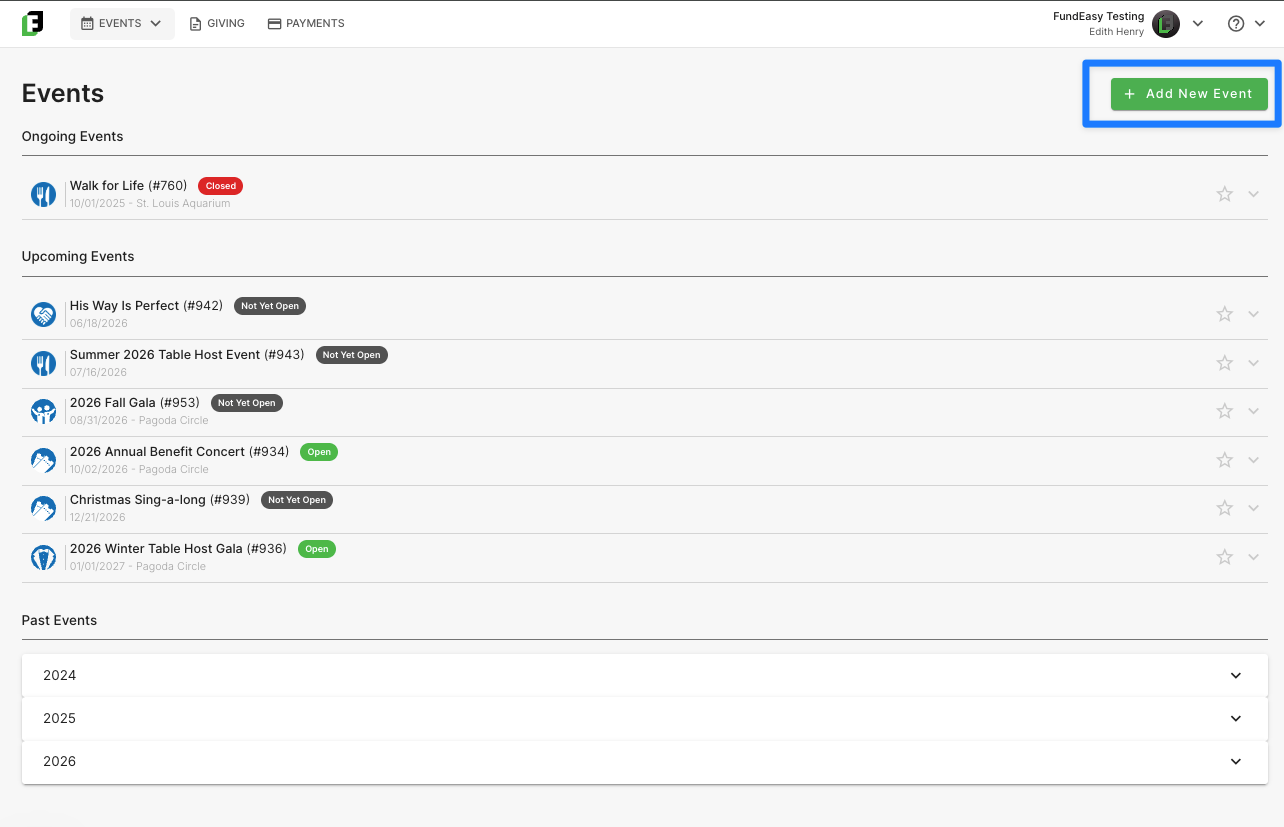
To create the new event, navigate to the event dashboard and click on “Add New Event” in the top right corner.
Starting a new event in FundEasy begins with one decision: which template to build it on. Get this right, and everything else — registration, tables, sponsors, payments — falls into place from there. This guide walks you through picking the right template in a couple of minutes, so you can start building with confidence instead of guessing.
Start here: 3 quick questions
Answer these in order. The first "yes" is your template.
Are you running a Table Host dinner (See https://helpcenter.fundeasy.com/articles/0066445-my-event-uses-table-hosts-do-i-need-a-vision if you’re not sure)? → Vision Dinner
Will your guests raise money on your behalf — through a walk, a team, or their own personal fundraising page? → Peer-to-Peer Event
Will guests pay a ticket or registration fee to attend AND/OR will you have paid sponsor tiers? → Paid Registration Event
None of the above — it's free to attend, and it's not a Table Host dinner or a peer fundraiser → Free Registration Event
If you already know your answer, then you can confirm your selection and click “Continue.” You’re ready to proceed directly to Step 2!
However, if you want to read more about each option, feel free to continue reading below!
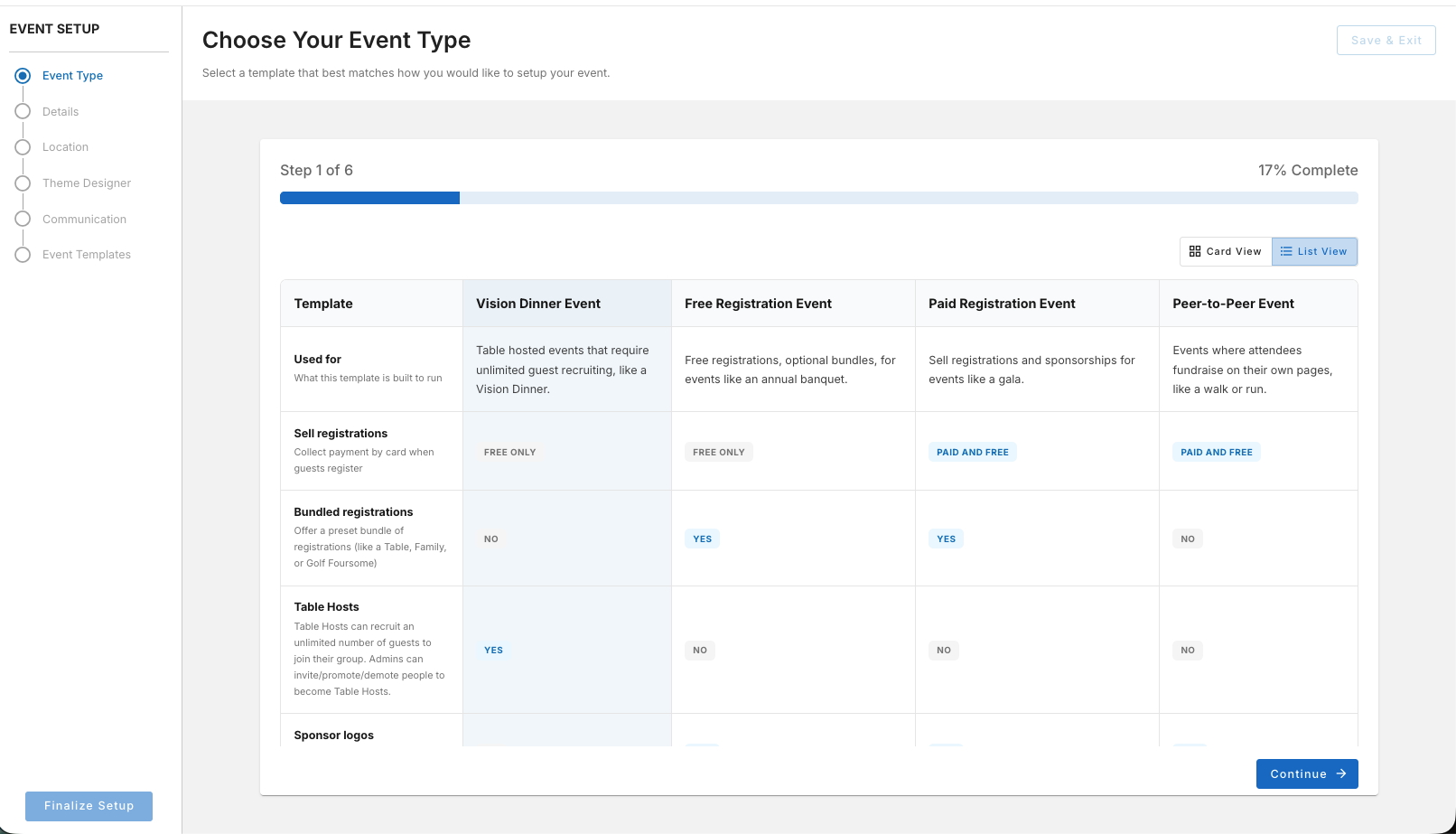
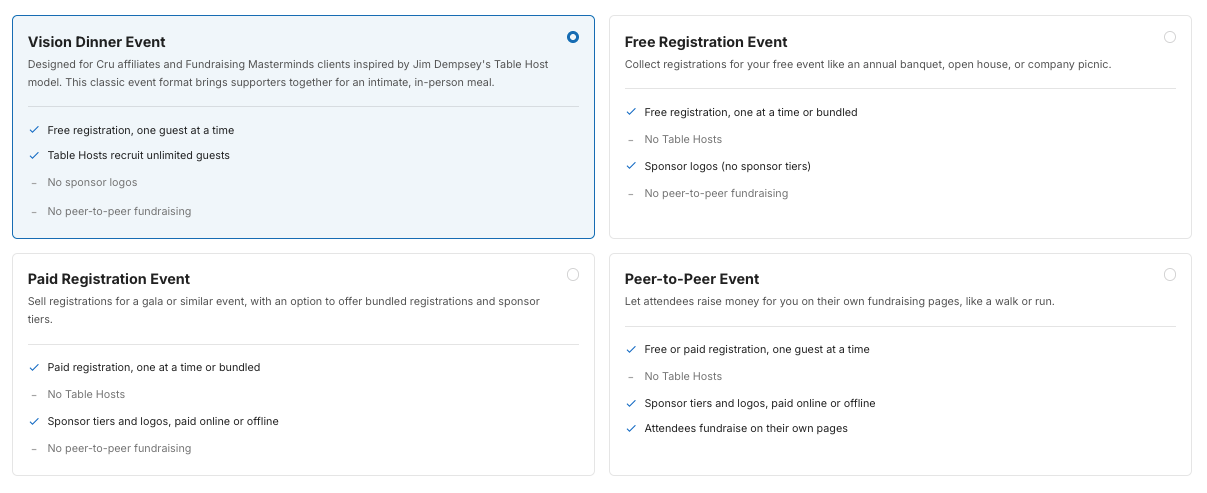
Meet the 4 templates
Each of these four templates has its own unique set of tools and features. By the end of this guide, you should have a good idea of which one is right for your event. And if you’re still not sure, just reach out to us at support@fundeasy.com—we’re happy to help you confirm your choice!
1. Vision Dinner
Best for: an intimate, in-person Table Host dinner — hosts invite their own tables of guests, and you track it all from one place. This model is especially popular with Cru affiliates and Fundraising Masterminds clients, but you don't have to be either to use it. If the Table Host format fits how you run your dinner, this is your template.
What's included:
Streamlined, free-to-attend registration for guests
Table Host tools so hosts can manage their own guest lists. Vision Dinner's Host Manager works on open invitations — hosts invite guests and FundEasy tracks who's registered, declined, or still pending. That's different from the Bundle tools Host Manager in Free/Paid Registration Event, which fills a fixed number of already-reserved seats instead.
Promote or demote table hosts at any time
Optional guest-selected hosting — guests can choose their host from a dropdown on the public registration form
Assign ungrouped registrations to an active table host
If you've run a Table Host dinner before, setup will feel familiar — you invite your hosts, they invite their guests, and you can watch it all come together from one place.
Note: Vision Dinner doesn't currently support Sponsor features — if you need to recognize sponsors, use Free Registration Event or Paid Registration Event instead.
2. Free Registration Event
Best for: any free-to-attend event — open houses, trainings, celebrations, community gatherings, or a fundraising dinner with reserved seating and sponsor recognition.
What's included:
Free registration and guest tracking
Optional Bundle tools, if you want to offer bundles like table packages, golf foursomes, etc. Bundles come with their own Guest List Manager, built for filling a fixed number of already-reserved seats — it won't feel identical to Vision Dinner's Host Manager, which is built around open invitations instead.
Optional Sponsor tools, if you want to recognize and thank supporters on your event page and emails
You're in control of how much you turn on. Leave Bundle and Sponsor features off for a simple RSVP event, or flip on whichever ones your event actually needs — nothing's forced on you upfront.
Note: Free Registration Event doesn't support Sponsor Tiers, since tiers are based on different payment levels — if your sponsors need tiered giving, use Paid Registration Event instead.
3. Paid Registration Event
Best for: ticketed events — galas, benefit concerts, comedy nights, conferences, or weekend retreats — with reserved seating and sponsor recognition available if you need them.
What's included:
Secure, easy checkout for ticket sales
Dedicated Payment Dashboard where you can handle both online and offline payment records as well as refunds
Optional Bundle tools, if you want to offer bundles like table packages, golf foursomes, etc.
Optional Sponsor tools, including Sponsor Tiers for supporters at different payment levels
Think of it as Free Registration Event with paid checkout built in. Set your ticket pricing during setup, then add Bundle and/or Sponsor features if your event calls for them.
4. Peer-to-Peer Event
Best for: walk-a-thons, benefit events, or any campaign where attendees fundraise on your behalf.
What's included:
Personal fundraising pages for each participant
Team fundraising
Registration (free or with a fee, depending on your event)
Once someone registers, they get their own page to share with friends and family — so the fundraising can start well before your event date arrives. Along the way, goal meters and countdowns help them (and you) watch progress build in real time.
Want people to fundraise together instead of solo? Team fundraising is built in too, so groups can combine efforts and enjoy a little friendly competition.
For more about creating an event with Peer-to-Peer fundraising enabled, refer to https://helpcenter.fundeasy.com/articles/8804980-creating-a-peer-to-peer-event.
Frequently Asked Questions
What if I'm still not sure which one fits?
Vision Dinner is the template that supports in-person Table Host dinner — so if your event is based on hosts inviting their own tables of guests, then start there, even if you're not a Cru affiliate or Fundraising Masterminds client. For more about the differences between Vision Dinner Events and other event types, you can refer to https://helpcenter.fundeasy.com/articles/0066445-my-event-uses-table-hosts-do-i-need-a-vision
If your guests are fundraising on your behalf instead of just attending, that's Peer-to-Peer Event.
Otherwise, ask yourself whether guests and/or sponsors pay to participate — that's usually the deciding factor between Free and Paid Registration Event. Still stuck? Chat with our Support team and we'll help you pick.
Can I change my template after I've already started setting up my event?
You can't change the template directly once you’ve picked an event template; however you CAN use Duplicate Event (from the event list "⋯" menu) and choose a different template for the copy. Your Event Details, Location, Theme/branding, and Communication settings all carry over automatically — you'll just need to redo registration, bundle, and sponsor setup in the new template since those differ significantly from one template type to another.
Will I lose my work if I switch templates?
Not all of it. Duplicating an event into a new template keeps your Event Details, Location, Theme (banners, colors), and Communication settings. Anything tied to registration types, bundles, or sponsor packages needs to be set up again, since those options differ from template to template.
I already have an event running on an older template — does any of this affect it?
No. This guide is about choosing a template for a new event. Any event you've already built keeps working exactly as it does today.
I’m still not sure: which template do I need?
If you're weighing your options or want a second opinion before you commit, reach out to our Support team — we'd rather help you start in the right place than have you rebuild later.
Was this helpful?
Still need help? Ask the team