How to Share Your Fundraising Page
Written By Edith Henry
Last updated 4 months ago
Once you create your fundraising page, sharing it is one of the most important steps in helping you reach your goal. Your page is designed to make it easy for friends, family, and your wider community to support your efforts, and you can share it as often as you like throughout the event.
Finding Your Fundraising Page Link
After setting up your page, you’ll receive an email that gives you access to it. You don’t need to remember a password or create an account—your secure link will always take you directly to your fundraising page.
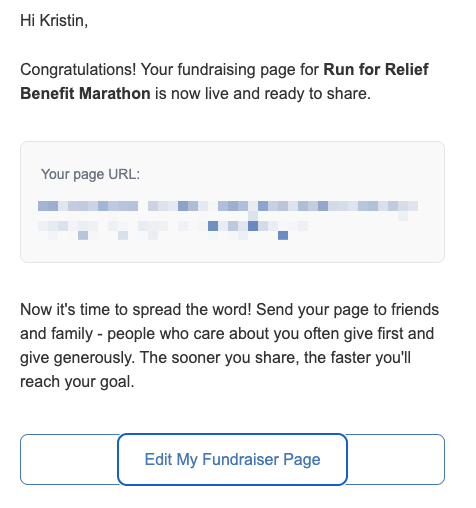
This same email provides the links you will need anytime you want to view, update, or share your page.
Updating Your Page
You can return to your fundraising page at any time using the same email link you received when you registered.
From there, you can update your page as needed and monitor your ongoing fundraising progress. There’s no need to create a separate account or remember a password—your email link always gives you access.
How to Share Your Page
After your page is live, you can start sharing it right away. You’ll be given a link that you can send through email, text message, or social media. Sharing your page helps introduce more people to the organization’s mission and gives them an easy way to support the event.
You can share your fundraising page just like you would share any website link. Copy your page link and send it through the channels you use most, such as:
Email
Text message
Social media (Facebook, Instagram, LinkedIn, X, etc.)
Direct messages or group chats
You can also post it publicly or privately depending on who you want to reach.
What Happens When Someone Visits Your Page
When someone opens your link, they’ll see your fundraising page where they can learn about your story, see your progress, and make a donation. The donation process is quick and mobile-friendly, so supporters can contribute from any device in just a few steps.
They may also see your progress toward your fundraising goal and, if enabled, other recent supporters who have donated.
Sharing More Than Once
Sharing your page isn’t something you do only once. Many participants share their page multiple times throughout the event to keep friends and family updated on their progress.
You can re-share your link whenever you want—especially when you reach milestones, receive donations, or want to remind your network about your fundraising efforts.
Tips for Effective Sharing
Here are a few simple ways to make your sharing more effective:
Include a short personal message when sharing your link
Explain why you’re participating and what the cause means to you
Share updates as you get closer to your goal
Thank supporters and encourage others to get involved
Even small updates can help keep your campaign active and visible.
Sharing your fundraising page is one of the most powerful ways to make an impact. Every time you share, you’re giving more people the opportunity to support your effort and help you reach your goal
Thank you for your support in helping bring this peer-to-peer campaign to life. Your time, effort, and commitment make a real difference in reaching our goal and sharing this message with others.
We truly appreciate you.