Exporting Your Fundraiser List to CSV
If you're running a Peer-to-Peer style giving page — a Birthday Fundraiser, a Baby Bottle Campaign, or any other page where individual supporters fundraise under one shared campaign — you can export your full list of fundraisers to a CSV file. This is handy when you want to work with the list outside of FundEasy, like importing it into an email tool to follow up with fundraisers who are close to their goal.
Where to find it
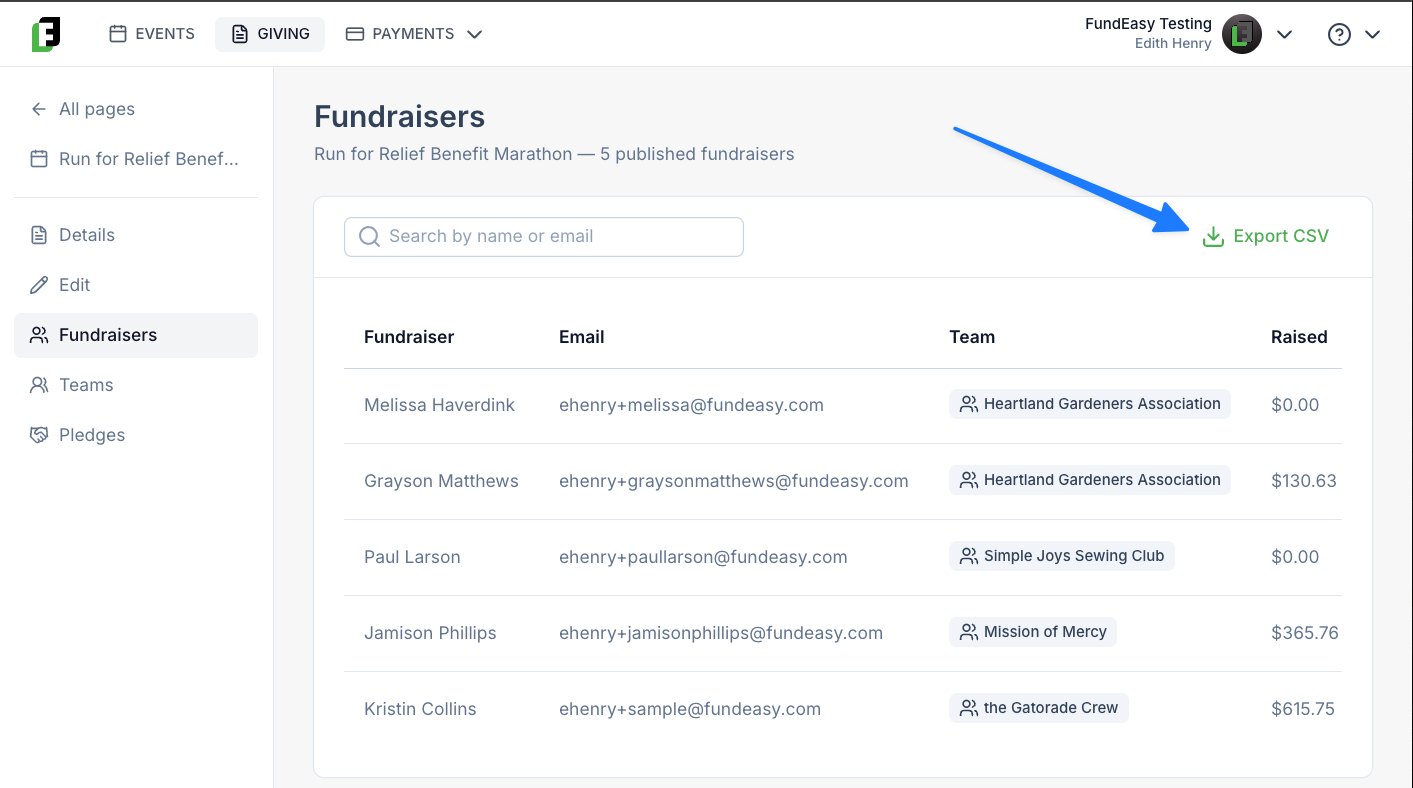
From your FundEasy dashboard, open the giving page and click View Details.
Click into the Fundraisers tab.
Click Export CSV.
The file downloads to your computer automatically, named:
<org_name>_<internal_page_name>_export_<yyyymmddhhmmss>.csv
For example, an export from a page with the internal name "Spring2026" for an org named "Riverside Youth Center," run on June 1, 2026 at 2:30 PM, would download as something like RiversideYouthCenter_Spring2026_export_20260601143000.csv.
What's in the file
Each row in the export represents one fundraiser on the page. The columns are:
A note on availability
This export is available on every Peer-to-Peer style giving page, including the newer Peer-to-Peer templates — so if you don't see the Fundraisers tab, double check that the page you're viewing is a Peer-to-Peer page rather than a single, non-team giving page.
Was this helpful?
Still need help? Ask the team