Creating a Baby Bottle Campaign
What is a Baby Bottle Campaign, and when should you use one?
A Baby Bottle Campaign supports the classic "take a bottle, fill it up, bring it back" fundraiser: an organization hands out empty bottles or jars to supporters, who fill them with spare change and cash over a set stretch of time and return them. Churches and pregnancy resource centers commonly run these during a defined season — such as during National Sanctity of Human Life Month or in the weeks between Mother's Day and Father's Day — but the model works for any group collecting small, tangible contributions from a community.
In FundEasy, the Baby Bottle Campaign template gives that physical collection drive an online giving page to match, so supporters who don't have a bottle in hand can still contribute, and everyone can see the campaign's progress in one place. It comes pre-configured for this use case, so you're not building a peer-to-peer page from scratch.
How to create a Baby Bottle Campaign
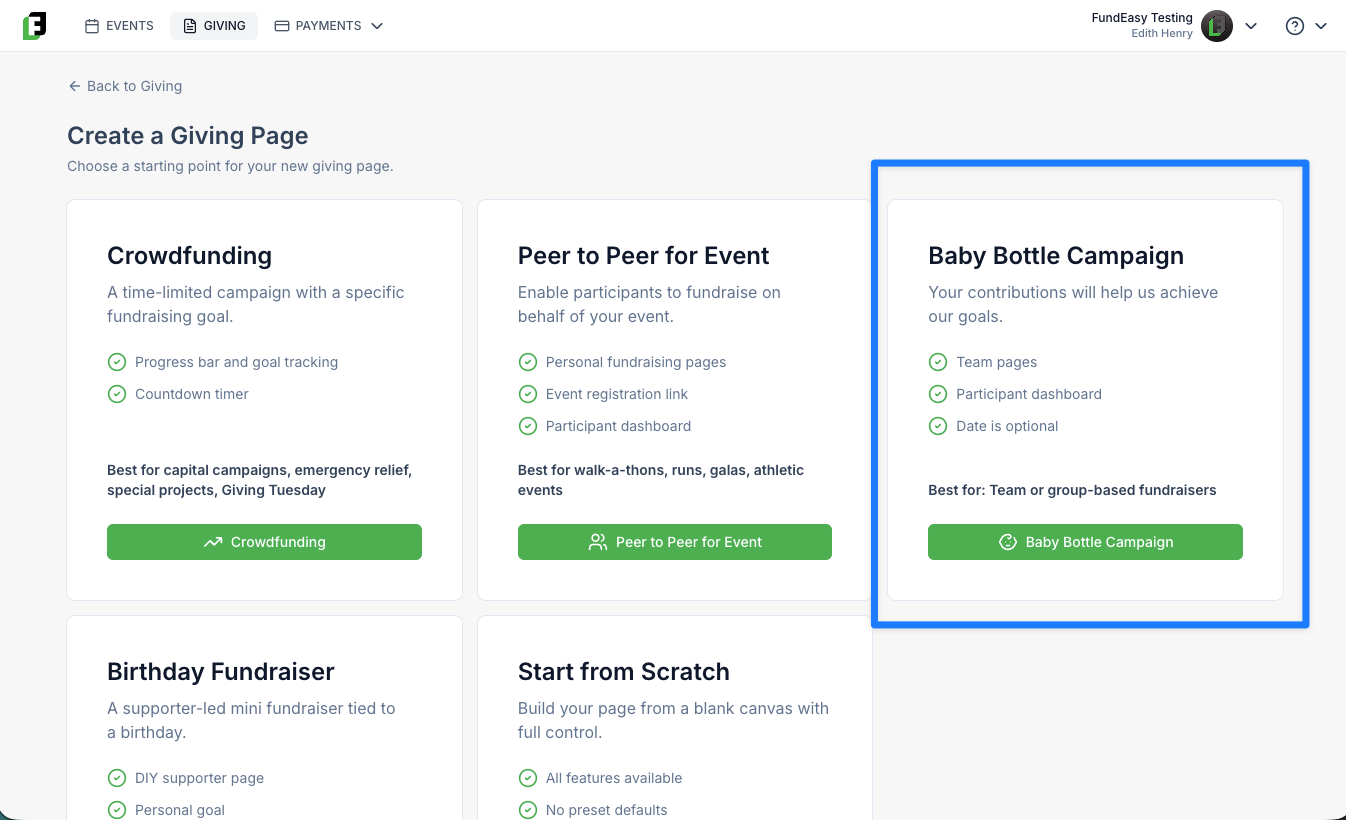
From your FundEasy dashboard, go to Giving > New.
Select Baby Bottle Campaign from the list of giving page templates.
FundEasy creates a new giving page pre-filled with defaults suited to this campaign type.
Review and edit any fields you'd like to change — headline, mission statement, banner image, donation amounts, fundraising goal, and so on.
Save and publish the page when you're ready to go live.
Note: the internal name and page slug are generated automatically and kept unique if you leave them blank. The page slug itself isn't exposed for manual editing on the form.
Default settings (reference)
Everything below is pre-filled to save you setup time, and every field is fully editable after the page is created.
What You Can Do with a Baby Bottle Campaign
Rally individuals and teams around the drive
A Baby Bottle Campaign is a peer-to-peer giving page, not tied to a specific event. Team fundraising is turned on by default — just like a Peer-to-Peer for Event page — so families, classrooms, small groups, or church ministries can each create their own page under the main campaign and fundraise as a unit.
Run it on your own timeline
A campaign date is common but optional. You can set a defined window that matches your bottle-distribution period, or leave the end date blank and run an ongoing, open-ended campaign.
Capture both one-time and recurring gifts
Recurring giving is enabled by default, so a supporter who wants to turn their one-time bottle contribution into ongoing monthly support can do that right from the same page.
Show momentum with goals and progress
A fundraising goal, progress bar, and donor count are all available to help supporters see the campaign building toward its target in real time — useful for keeping a multi-week collection drive visible and motivating.
Add friendly competition with the leaderboard
The leaderboard is off by default but can be switched on any time you want to spotlight top individual or team fundraisers — a common way to add momentum to a bottle drive in its final stretch.
Collect pledges, not just payments
Pledges are enabled by default, which matters for this fundraiser type: supporters often commit to filling a bottle over several weeks before they hand over the total. The separate "Allow pledges in progress" option (off by default) lets you track those in-progress commitments distinctly from completed gifts.
Export your fundraisers list to CSV
Once supporters start joining, you can export the full list of fundraisers — names, emails, amounts raised, and more — to a CSV file. This is handy when you want to work with the list outside of FundEasy, like importing it into an email tool to follow up with fundraisers who are close to their goal. See https://helpcenter.fundeasy.com/en/help/articles/7857494-exporting-your-fundraiser-list-to-csv
Was this helpful?
Still need help? Ask the team