The Host Manager Tool for Vision Dinner Events
Understanding the Host Manager
The Host Manager is a self-service portal that allows event hosts to invite guests, monitor RSVPs, and build their guest list without requiring assistance from an event administrator.
When hosts register, they automatically receive a Host Confirmation Email containing a Manage Guest List button that opens the Host Manager interface. This delegation mechanism enables event coordinators to distribute guest recruitment responsibilities while maintaining oversight of registrations. It’s a self-service portal that lets hosts invite guests, register people on their behalf, and keep an eye on RSVPs — all without needing to go through an event coordinator.
Hosts can click back into their Host Manager Tool any time they want to grow their guest list or check on it.
What All Can a Host Do in the Host Manager Tool for my Vision Dinner Event?
The Host Manager Tool gives your Vision Dinner hosts a convenient place to manage their guest lists without needing to go through you for every update.
From the Host Manager, hosts can:
Add guests directly when they already know who will be attending.
Invite guests by email so those guests can complete their own registration.
Track invitations to see which guests have registered, declined, or still need to respond.
View their guest list and keep track of everyone connected to their table.
Contact the event coordinator directly from the Host Manager if they need to request a change or have a question.
For complete instructions on using these features, refer to https://helpcenter.fundeasy.com/articles/3017104-the-host-manager-tool-for-vision-dinner-events-host-resource. This resource was specifically written with your hosts in mind, so feel free to share it directly with them as a helpful guide!
What If a Host Loses the Host Manager Tool for my Vision Dinner Event???
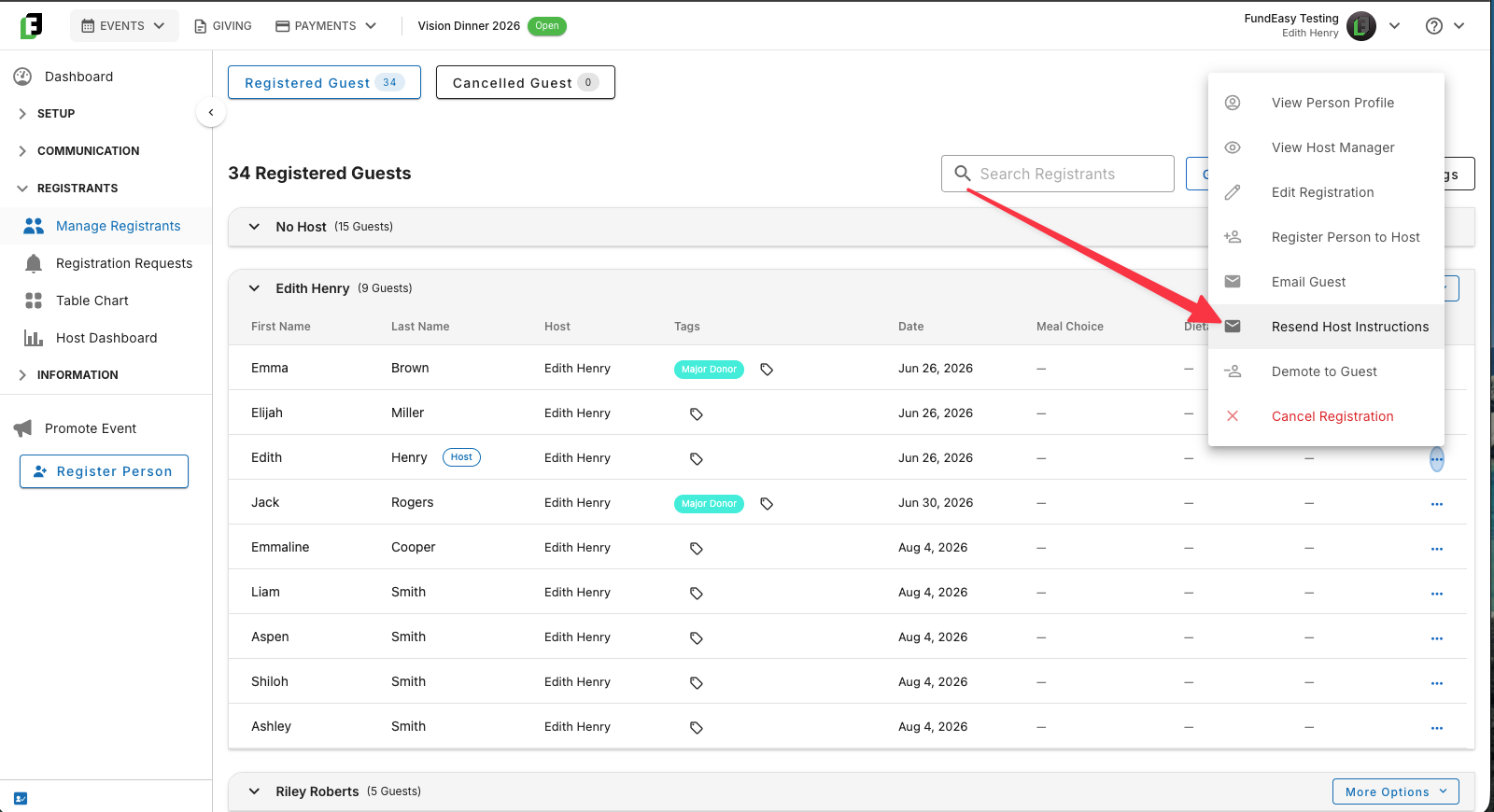
If one of your event hosts can't find the email containing the Host Manager link, there's no need to panic. As an event administrator, you can easily send them a new link.
Simply navigate to Manage Registrants > Guest List and find the host who needs the link. From the host's menu, select Resend Host Instructions. This will send them a new email with access to the Host Manager Tool, so they can get back up and running.
Was this helpful?
Still need help? Ask the team