Registration Source Breakdown
Written By Edith Henry
Last updated 7 months ago
On your Event Summary Report, you will find a section called your Registration Source Breakdown. This gives you a helpful snapshot of where your guest registrations are coming from.
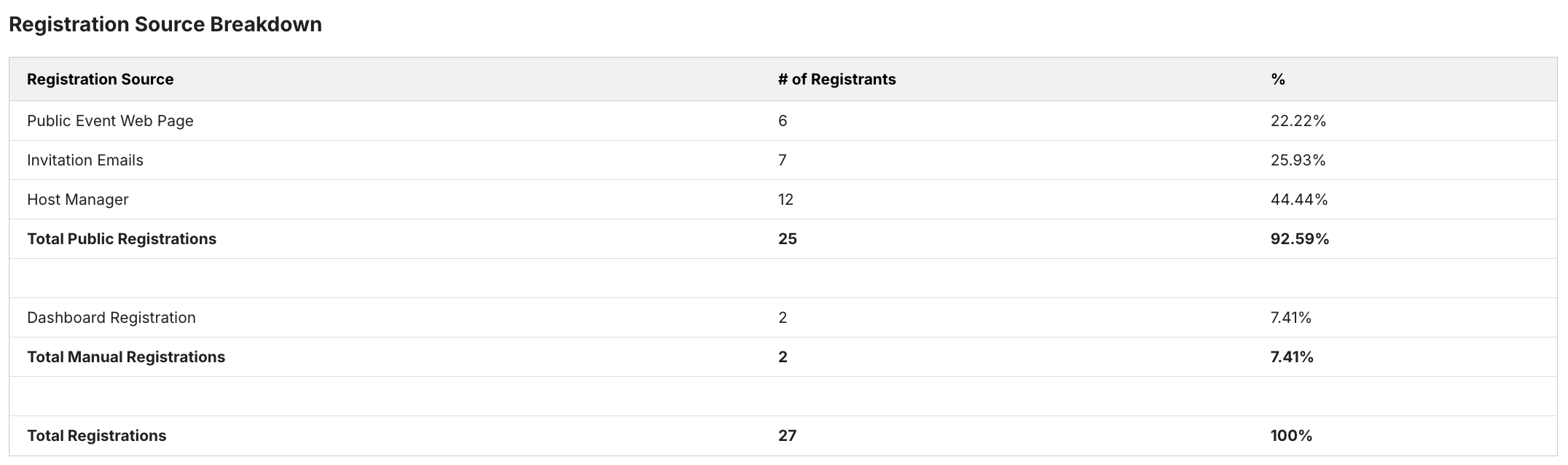
Your event will be filled with registrants from two major categories: public registrations (those that happened through your event web pages and invitation tools) and manual registrations (those that you completed on behalf of a guest).
Public Registrations
There are three types of public registration: Public Event Web Page, Invitation Emails, and Host Manager [Note: “Host Manager" will not be present in a non-Table Hosted event]. To understand these three subcategories, it is actually helpful to think of them as nested filters.
The first filter is “Host Manager” registrations—this category shows you all the registrations that you can credit to the hard work of your Table Hosts! This count increments whenever a table host registers someone to your event through any of these three options from the Group Host Manager:
Add Guest Manually
Send Registration
Invite Guest
The second filter is “Invitation Emails.” This count increments whenever someone registers through an "Accept" button in any email invitation that was NOT sent by a table host.
The final filter is "Public Event Web Page." This count will increment for any registrations through the public checkout page that were NOT completed via a host manager tool OR an email invitation [for example: registrations occurring via a QR code in a church bulletin, an event mailer, a link from the org's website under "Upcoming Events," etc.].
Dashboard Registrations
Dashboard registration increment if the admin registers someone using the "Register Person" button from the sidebar.